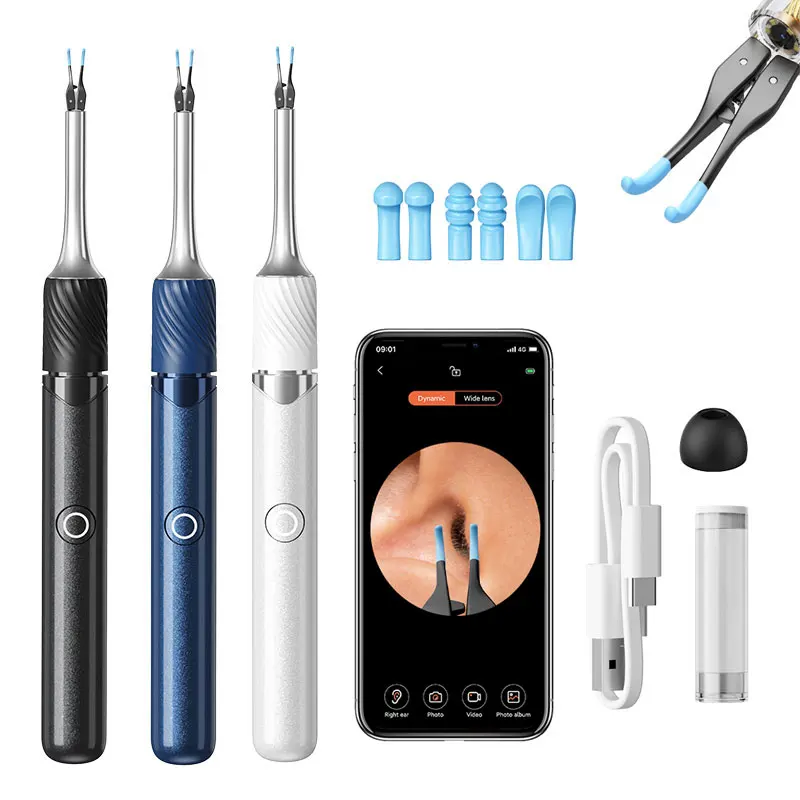
Visual Ear Cleaner with Camera Ear Wax Removal Tool with Ear Pick & Tweezers 12 Megapixels 6 Ear Spoons Earwax Removal Ears Care
$75.75
$105.3
SPECIFICATIONS Brand Name: SUNUO Choice: yes Function1: Ear Cleaner with Camera and Tweezers Function2: Visual Ear Cleaner Tweezers Function3: Ear Cleaner Tweezer Function4: Ear Cleaner Function5: Ear wax removal Function6: Eleactric Ear Cleaner High-concerned chemical: None Is Batteries Included: Yes Item Type: ear care Material: ABS PC Model Number: Wireless Ear Cleaner Number of Pieces: Combo Origin: Mainland China Ear Wax Removal Tool with Camera Visual Ear Cleaner with Ear Pick & Tweezers 12 Megapixels 6 Ear Spoons Earwax Removal Ears Care Specification Product name:Visual Ear Pick Tweezers Lens grade:High-precision endoscope Focal distance:1.4-2cm Gyroscope:6-Axis gyroscope Working frequency:2.4GHz Image transmission rate:20fps Working environment:-10°C~45°C Operating Voltage:3.45V~4.2V Charging time:About 60 Min Battery life:About 70 Min Input Current:5V 0.5A Network standard:IEEE 802.11b/g/n Ear Wax Removal Kit Includes 1×Smart Visual Ear Tweezers 6×Silicone Ear Spoons, 1×Type C Charging Cable 1×User Manual. The earwax removal tool camera compatible with Tablet, Android, and iOS devices. Simply download the app and connect the device via Wifi. The app allows you to take pictures, film videos, and easily share your experiences with loved ones. Precautions: 1. When in use, the temperature of the product will rise slightly (up to 38°), which has no effect on the human body, please use it with confidence. 2. When cleaning the lens, it is recommended to wipe carefully with a professional alcohol swab. 3. Please observe the surrounding area before use, and do not use it in an environment where people are running. 4. This product is not suitable for children under 3 years old. 5. It is forbidden for children to use this product alone to avoid accidental injury. 6. Do not use the host body in liquid to avoid water damage. 7. The product has a built-in lithium battery. If it is not used frequently, it needs to be charged once a month. 3 in 1 Visual EaPick Tweezers:Visual Model / Ear pick Model /Tweezers Model 12 Million HD pixels,Clampable robotic arm,4pcs earspoons Omnidirectiona 9 gyroscope,Temperature control,Wi-Fi connection Can be picked and clamped:More practical than traditional ear spoons Open the tweezers and remove thelarge pieces of earwax. Put on the siliconecover and you can clean your ears Visible tweezers are more reassuring: See the inside of the ear clearly, avoid blind extraction, and use precise forceps 360 degrees control roboticarm tweezers, Press at any angle to clamp, get rid of allkinds of dirt in the ear canal Tweezers silicone design to protect the ear canal: Comfortable to pick up dirt in the ear,soft and does not hurt the ear Q bomb silicone ear spoon cover Soft and comfortable, multiple accessories the whole family can use 12 Million HD pixels: High-definition imaging, details are not afraid of being magnified 3.2mm -Diameter,10-50mm-Depth of field,1.4-5cm-Focal distance Wide-range Wi-Fi chip.stable transmission: 5m-Wide area coverage 30FPS-lmage transfer rate Thermostat controlnon-stimulating: Avoid high temperature damage to ear canal during use Otoscope constant temperature 25℃ Handheld part body temperature 32℃. Can be used by the whole family Trouble shooting 1.Camera is blurry/unclear: Wipe the lens with a cotton swab dipped in water or alcohol 2.No response when booting: Fully charged and reused 3.App crashes: Clean up the background of the mobile phone and restart the APP 4.Camera light is off: Shut down and restart the device 5.Product flashing red light: The product is in use after it is fully charged 6.After the product is successfully connected,the real-time image cannot be displayed normally: Disconnect the phone from the product's Wi-Fi, restart the machine, reopen the APP, and reconnect to the product's Wi-Fi 7.Wi-Fi connection is unstable and disconnects after a few seconds Restart the device, restart the connected device Wi-Fi 8.Disorientation when using Switch the left/right ear mode at the bottom of the APP interface